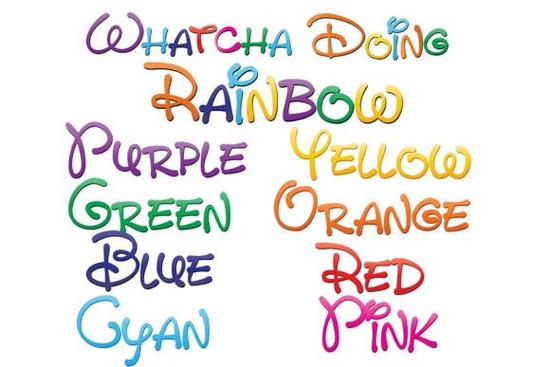
When you are looking for typography that feels personal and energetic, standard monochrome options often fall short. You need something that pops off the screen or stands out on a printed shirt immediately. This is where the Whatcha Doing Font comes into play for many creators seeking unique visual assets. It offers a playful aesthetic that fits well across various projects, from social media graphics to physical merchandise. Unlike traditional typefaces, this family introduces a level of vibrancy usually reserved for custom illustration.
Are color fonts tricky to install?
Many people hesitate to use OpenType Full-Color (SVG) files because they worry about complex setup procedures. Fortunately, installing this package follows the same steps as any standard lettering collection. On a Mac, users simply double-click the files in FontBook to add them to the system. Windows users can go through the Control Panel or their preferred font manager to complete the registration. Once installed, the letters sit in your application menu just like any other character set.
The confusion usually happens after installation when selecting the text. In some applications, you will see the font listed correctly, but the output remains black before typing. This does not mean the file is broken. It simply means the software is rendering a grayscale version of the shape because it hasn't yet processed the color layer during the preview stage. As soon as you input characters into the active document box, the multi-colored gradients appear if the program supports the feature.
Which software works best with these graphics?
To get the most out of full-color SVG fonts, you need to choose editing tools that handle color layers natively. Several professional and craft-oriented applications currently recognize these formats. Adobe products, such as Illustrator or Photoshop, are known to render them well. For vinyl cutting and crafting enthusiasts, Silhouette Studio is a strong choice, allowing you to cut along the colored paths or just use the shape. Quark and Inkscape also support these specifications at this time.
- Adobe Creative Cloud: Best for vector manipulation and brand identity work.
- Silhouette Studio: Ideal for makers planning to cut stickers, decals, or t-shirt transfers.
- Inkscape: A great free alternative for those who need robust vector editing.
If you try to open the file in a basic word processor or older design tool, expect to see a uniform black text result. This limitation exists because the program lacks the engine required to display the embedded gradient data.
Can I resize the text without quality loss?
Yes, one of the strongest advantages of using vector-based types is scalability. Because the shapes are defined by mathematical curves rather than pixels, you can stretch them from tiny icons to massive billboards without seeing jagged edges or blur. This makes the pack perfect for logo design where you might need a smaller favicon version and a larger header size simultaneously. You also maintain crisp lines regardless of the final resolution, ensuring your work looks professional at any scale.
This flexibility allows you to create everything from simple text labels to complex illustrated headlines. Since each of the nine full-color options features a distinct gradient, you have plenty of variety to match different moods. Whether you want a bold statement piece or something softer, you can swap between the eight rainbow hues or the ninth combined variant instantly. For those exploring similar vibrant collections, you might want to browse these vibrant options further to find more complementary assets.
Why does my text appear black sometimes?
Troubleshooting color fonts often centers on the display environment. Even in supportive programs, the preview window in font managers may show the glyphs as plain black outlines. This is expected behavior. You can confirm whether your software is functioning correctly by opening a new blank canvas, selecting the font, and typing a quick sentence. If the document view renders the rainbow gradient, the installation is successful.
It is important to remember that exporting the file is crucial for sharing. When saving for web use, ensure you choose a format like PNG or SVG that preserves transparency. If exporting as PDF, verify that the color profile settings allow full color output to prevent flattening back to grayscale. Always test a sample before committing to a large project batch.
If you need to verify the source or grab the latest version directly, you can find Whatcha Doing Font for detailed purchasing options. This ensures you are getting the authentic high-quality files intended for commercial use.
Practical Setup Checklist
- Verify Compatibility: Check if your design software supports SVG OpenType color fonts before starting the download.
- Install Carefully: Follow the specific instructions for your operating system (FontBook for Mac or Control Panel for Windows).
- Test a Sample: Type a short phrase to ensure the colors load in your workspace.
- Export Settings: Save outputs in a format like SVG or PNG that retains color depth.
 Mozathia Font: Modern Handwriting for Your Projects
 Pink Vibes Duo: Creative Font Pairing for Design Projects
 Fresh Fonts: Lemon's Creative Typography Ideas
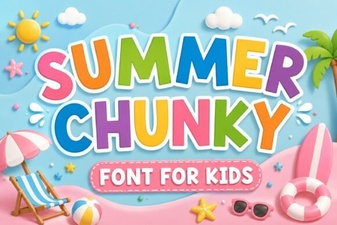 Chunky Summer Fonts for Bold Design Projects
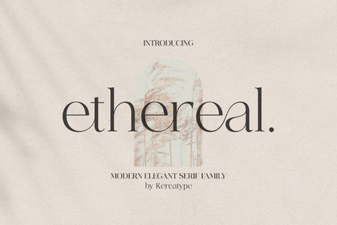 Ethereal Fonts for Elegant Web Design Projects
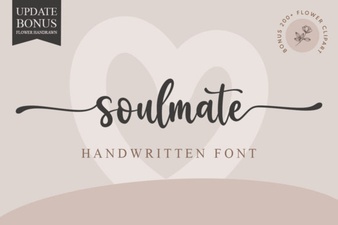 Soulmate Font Ideas for Creative Typography Projects